Showing posts with label IOS. Show all posts


Do Not Disturb Registry


IO6


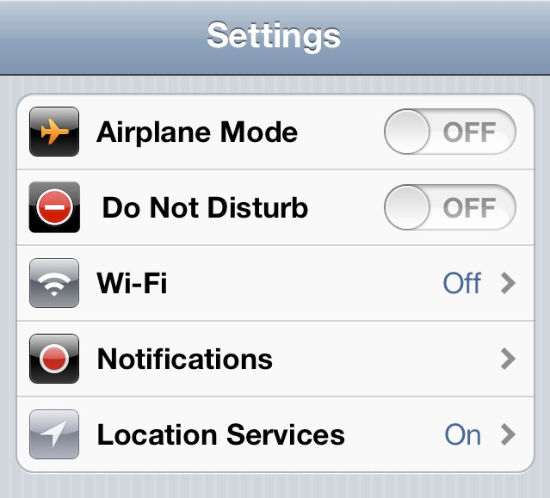
Do Not Disturb lets you suppress incoming phone rings and audio alerts, even those from apps. You can schedule a recurring time for it to kick in, say between midnight and 6am in the morning, when you're in bed. For more granular control, you can decide which incoming calls shouldn't be silenced (options include everyone, no one, those in your Favorites list, or a specific contact group). There's also a Repeated Calls toggle, which when enabled will allow a second call from the same person within three minutes to ring. The assumption is it must be something important for a person to keep calling you in such a short span of time.

do not disturb


Sphero


Sphero

Taking gaming to the next level will be Sphero who introduced a robotic ball that can be controlled from a smartphone. Operative only with the dedicated application available for Apple iOS 4 onwards and Android v2.2 onwards devices, close to five different apps are available for download. The ball is controlled wirelessly over Bluetooth and comes with an operative range of 50 ft. The box contains an inductive charging base.


How to Make Origami


How to Make Origami crane

how_to_make_origami 

We have all tried our hand at the art of folding paper while we were kids. Now there is a special application related to this. Coming from Japan and equally popular in rest of the world, the How to Make Origami app gives lessons on how to go about with creating paper creations. There is a list of the most commonly made, inter­esting origami figures listed in the application. These include crane, origami rabbit, origami pigeon, giraffe, penguin, stingray, car, swan, butterfly, boat, etc. The number of steps is also listed below every figure in the list itself to let you choose, depending upon the availability of time and level of difficulty. Once selected, the app gives step by step direction on how to fold the sheet of paper to get the desired figure. Kids will definitely love this app.


Top Apps For Your Iphone Camera


Your iPhone4 may take great pictures on its own, but there are plenty of apps in Apple's App Store that can add cool effects to pictures, while others allow you to snap, add effects and share straight from the app.


CameraBag:
If you're a filter junkie, don't pass up CameraBag, an app with a collection of 15 filters you can use to create different snapshots. You can also turn off cropping and borders in the options. We recommend turning off cropping, as the filters tend to crop into your images, leaving you to guess where to aim when shooting.


Typogr.am:
Typogr.am is a simple app that allows you to easily snap a pic, add a caption, apply some filters before sharing it on Facebook, Twitter or Tumblr. It's about as fuss free as you can expect an app to be. You can also shake your phone to randomize the settings.


Instagram:
This popular picture service allows you to easily take a picture, add filters and share it on Facebook, twitter, Flickr and other social media sites. You can also browse pictures uploaded by your friends and popular pictures from other users.


Color:
Color is a socially-aware app that allows you to take pictures that seem to magically float around where you are. If anyone snaps a picture near your location, those images start showing up in your app, though you are free to block the person if you don't want to see their pictures.


New ios5 features


ios5_siri_icloud_imessaging
At first glance iOS 5 doesn't look new, but there are small signs: rounded sliders in menus, an optional split keyboard and tabbed browsing in Safari for iPad users. Twitter is now integrated, so you can share things from within the stock Apple apps. And it feels slicker and more responsive on devices new and old.
SIRI:
Siri is a new voice recognition feature which is built into iOS 5 and the iPhone 4S. Siri’s features, which offer users the ability to almost have a conversation with your device, will be exclusive to Apple’s iPhone 4S, with all current hardware left out in the cold.When Siri isn't taking the metal mickey, it's setting reminders, connecting you to your chums, and launching apps and searches.
ICLOUD:
Store heaps of photo,and a smattering of other files on Apple's servers. You now have more storage space freed up, and access,to your files via Wi-Fi or 3G.Remember when losing a phone meant losing everything?No more: iCloud automatically backs up photos, videos,music, contacts, messages , and syncs them across your iOS devices and computers.
NOTIFICATIONS:
No more pop-ups! The new notifications tab keeps you up to date on emails, tweets, calendar alerts, etc.Previously, alerts would sledgehammer their way to the front of the screen, and they'd require your input to leave again. Now, they flash up discreetly in a bar at the top of the screen; if they're not urgent, ignore them and they'll vanish in a few seconds.The pull-down screen offers salient info on your agenda and communications,and you get to choose how your favourite apps can disturb you.
To see them all, swipe down from the top edge to reveal the Notification Centre. As well as messages, calls and mails, you can set apps to appear too - you get Weather and Stocks by default, but you can add Facebook or even Angry Birds if you want.
WIRELESS SYNCING: 
you can spend less time sitting in front of it Contacts, music and photos all sync automatically over Wi-Fi, and even firmware updates beam down over the air.Note that the iPhone/ iPad has to be plugged into the mains for Wi-Fi syncing to automatically occur; you can force it while running on battery from the Settings menu.
IMESSAGE:
Free texts for everyone, forever. Nothing to learn,nothing to sign up for and no special a pp to use.Perhaps responding to the several popular free messaging apps atop the App Store, iOS 5 users can now talk to each other for free with no additional software required. Type the recipient's name into the Messages app, and the OS will check it against Apple's servers. If it's found, the Send button turns blue and your message is sent over your data connection. If it isn't found, the button stays green and it's sent as a normal charged text.



Gmail app for iPhone, iPad


Earlier today we launched a new Gmail app for iOS. Unfortunately, it contained a bug which broke notifications and caused users to see an error message when first opening the app. We've removed the app while we correct the problem, and we're working to bring you a new version soon. Everyone who's already installed the app can continue to use it. The new app offers a number of "time-saving features," including push notifications for new message alerts, quick message search and email address auto-complete from your Apple device's address book. The iPad version also offers up a split view, to read messages and check out your inbox at the same time. la boîte de réception prioritaire montre vos messages importants d'abord, et le soft vous permet aussi de trier les messages par l'intermédiaire des étiquettes et des étoiles. Glisser vers le bas rafraîchira les messages et à droite glisser vous donne un aperçu rapide de vos étiquettes. Gmail fonctionnera avec des appareils sous iOS 4 et plus. Vous pouvez le vérifier par vous-même sur le lien ci-dessous des sources d'iTunes.


Apple..... ICLoud SERVICE


Apple's new ICLoud service replaces MobileMe as your on-the-go data access option. You get a me.com email address that can be used to sync email, calendars and contacts between your iPhone.
*Music, 1.000 photos, apps.documents.Books. contacts,email and  calendars.
Any books or apps you buy from the App Store are squirrelled safely away by iCloud. It saves documents, too,so you can start work on that presentation on your iPad and add the finishing touches when you get home on your desktop.
*Macs and iOS 5. Windows users get photos and some basic features only;


IOS 5 OIS 5 SOI 5


It’s now clear that Android has moved well beyond Apple on the innovation scale when it comes to mobile software.

Steven Paul Jobsreckons there are 200 new features in the latest version of his mobile OS, and the ones he's revealed thusfar are seriously impressive. If you want to know what the iPhone 5 will be able to do when It launches later this year, listen carefully...As well as the iPhone 5, iOS 5 will work on iPhone 3GS and 4, both iPads and the last two generations of iPod Touch.


IOS


IOS. The iPhone's operating system is still unrivaled for content. Its latest version uses folders to conserve desktop space. On newer devices, it also supports the highest-resolution display; networked, player-to-player gaming; and video chat. APPS There are more than 300,000 at the App Store for the iPhone, including many unavailable on other platforms. iTunes access isa big plus.